Difference between revisions of "Calendar"
From Student Progress Center
Jump to navigationJump to search (Created page with "<font size = "2"> ---- '''Student Progress Center''' Main Page :'''Accessing SPC''' Page") |
|||
| Line 1: | Line 1: | ||
<font size = "2"> | <font size = "2"> | ||
| + | After clicking on your child, the Student Home page will be displayed on the screen. | ||
| + | #Click on "Calendar" to view your child's activities.<br /><br />[[File:Attendance.png]]<br /><br /> | ||
| + | # A calendar will appear with assignments due, <br /><br />[[File:Attendance1.png]]<br /><br /> | ||
| + | #To return to the Student Home page, click the button "Student Home" in the upper left corner of the screen. | ||
| + | #To return to the main Student Progress Center Screen, click the "Main" button in the upper right corner of the screen. | ||
Revision as of 16:05, 29 July 2014
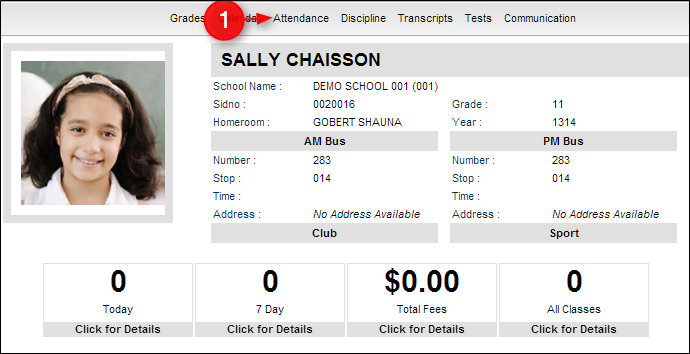
After clicking on your child, the Student Home page will be displayed on the screen.
- Click on "Calendar" to view your child's activities.
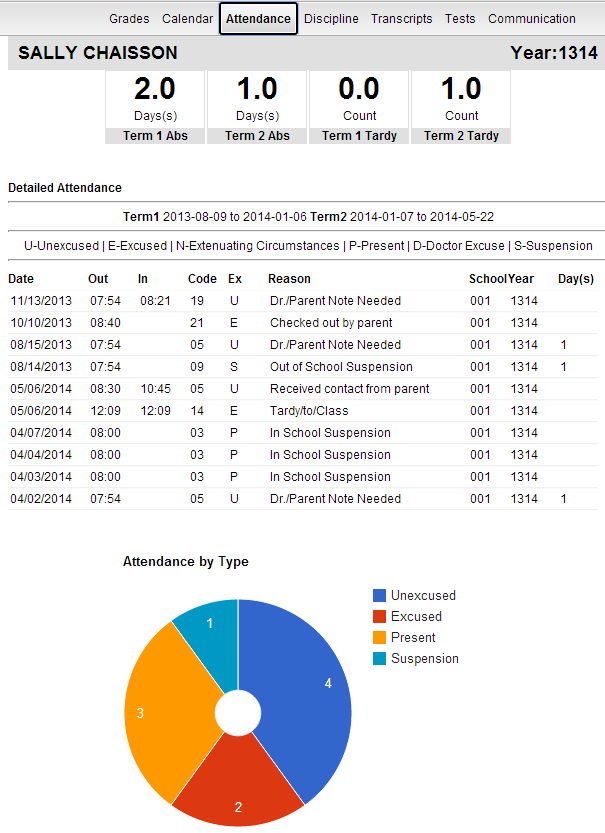
- A calendar will appear with assignments due,
- To return to the Student Home page, click the button "Student Home" in the upper left corner of the screen.
- To return to the main Student Progress Center Screen, click the "Main" button in the upper right corner of the screen.


